


Product
Introducing Reports: An Extensible Reporting Framework for Socket Data
Explore exportable charts for vulnerabilities, dependencies, and usage with Reports, Socket’s new extensible reporting framework.
By André Staltz - Apr 21, 2026
infinite-tree
Advanced tools
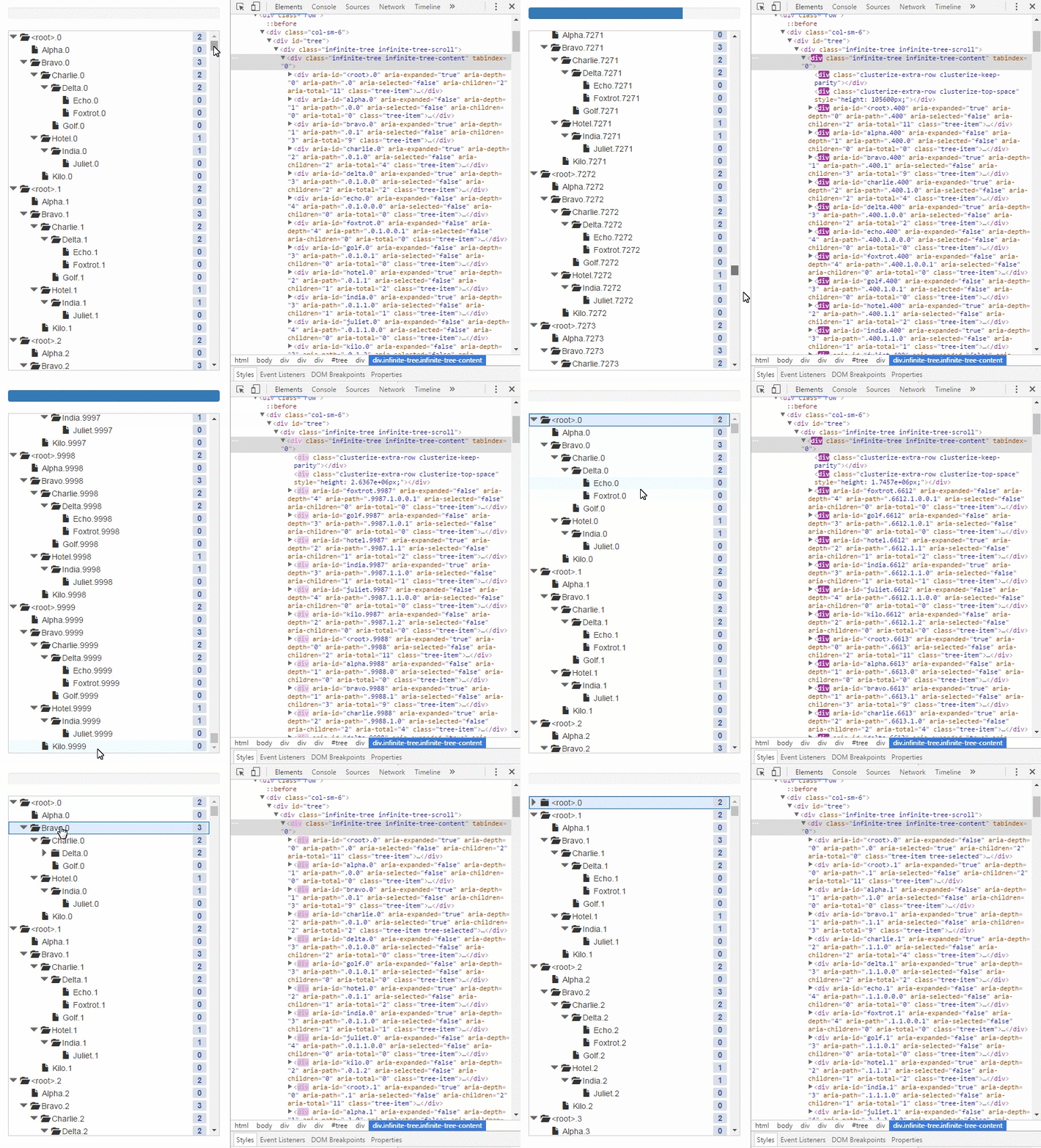
A browser-ready tree library that can efficiently display a large amount of data using infinite scrolling.



A browser-ready tree library that can efficiently display a large tree with smooth scrolling.
Demo: http://cheton.github.io/infinite-tree
 Chrome |  Edge |  Firefox |  IE |  Opera |  Safari |
|---|---|---|---|---|---|
| Yes | Yes | Yes | 8+ | Yes | Yes |
Need to include es5-shim polyfill for IE8
Check out react-infinite-tree at https://github.com/cheton/react-infinite-tree.
npm install --save infinite-tree
const InfiniteTree = require('infinite-tree');

// when using webpack and browserify
require('infinite-tree/dist/infinite-tree.css');

const data = {
    id: 'fruit',
    name: 'Fruit',
    children: [{
        id: 'apple',
        name: 'Apple'
    }, {
        id: 'banana',
        name: 'Banana',
        children: [{
            id: 'cherry',
            name: 'Cherry',
            loadOnDemand: true
        }]
    }]
};

const tree = new InfiniteTree({
    el: document.querySelector('#tree'),
    data: data,
    autoOpen: true, // Defaults to false
    droppable: { // Defaults to false
        hoverClass: 'infinite-tree-droppable-hover',
        accept: function(event, options) {
            return true;
        },
        drop: function(event, options) {
        }
    },
    shouldLoadNodes: function(parentNode) {
        if (!parentNode.hasChildren() && parentNode.loadOnDemand) {
            return true;
        }
        return false;
    },
    loadNodes: function(parentNode, next) {
        // Loading...
        const nodes = [];
        nodes.length = 1000;
        for (let i = 0; i < nodes.length; ++i) {
            nodes[i] = {
                id: `${parentNode.id}.${i}`,
                name: `${parentNode.name}.${i}`,
                loadOnDemand: true
            };
        }

        next(null, nodes, function() {
            // Completed
        });
    },
    nodeIdAttr: 'data-id', // the node id attribute
    rowRenderer: function(node, treeOptions) { // Customizable renderer
        return '<div data-id="<node-id>" class="infinite-tree-item">' + node.name + '</div>';
    },
    shouldSelectNode: function(node) { // Determine if the node is selectable
        if (!node || (node === tree.getSelectedNode())) {
            return false; // Prevent from deselecting the current node
        }
        return true;
    }
});
const node = tree.getNodeById('fruit');
// → Node { id: 'fruit', ... }
tree.selectNode(node);
// → true
console.log(node.getFirstChild());
// → Node { id: 'apple', ... }
console.log(node.getFirstChild().getNextSibling());
// → Node { id: 'banana', ... }
console.log(node.getFirstChild().getPreviousSibling());
// → null
Learn more: Events
tree.on('click', function(event) {});
tree.on('doubleClick', function(event) {});
tree.on('keyDown', function(event) {});
tree.on('keyUp', function(event) {});
tree.on('clusterWillChange', function() {});
tree.on('clusterDidChange', function() {});
tree.on('contentWillUpdate', function() {});
tree.on('contentDidUpdate', function() {});
tree.on('openNode', function(Node) {});
tree.on('closeNode', function(Node) {});
tree.on('selectNode', function(Node) {});
tree.on('checkNode', function(Node) {});
tree.on('willOpenNode', function(Node) {});
tree.on('willCloseNode', function(Node) {});
tree.on('willSelectNode', function(Node) {});
tree.on('willCheckNode', function(Node) {});
Sets the checked attribute in your rowRenderer:
const tag = require('html5-tag');

const checkbox = tag('input', {
    type: 'checkbox',
    checked: node.state.checked,
    'class': 'checkbox',
    'data-indeterminate': node.state.indeterminate
});
In your tree, add 'click', 'contentDidUpdate', 'clusterDidChange' event listeners as below:
// `indeterminate` doesn't have a DOM attribute equivalent, so you need to update DOM on the fly.
const updateIndeterminateState = (tree) => {
    const checkboxes = tree.contentElement.querySelectorAll('input[type="checkbox"]');
    for (let i = 0; i < checkboxes.length; ++i) {
        const checkbox = checkboxes[i];
        if (checkbox.hasAttribute('data-indeterminate')) {
            checkbox.indeterminate = true;
        } else {
            checkbox.indeterminate = false;
        }
    }
};

tree.on('click', function(node) {
    const currentNode = tree.getNodeFromPoint(event.clientX, event.clientY);
    if (!currentNode) {
        return;
    }

    if (event.target.className === 'checkbox') {
        event.stopPropagation();
        tree.checkNode(currentNode);
        return;
    }
});

tree.on('contentDidUpdate', () => {
    updateIndeterminateState(tree);
});

tree.on('clusterDidChange', () => {
    updateIndeterminateState(tree);
});
const el = document.querySelector('#tree');
const tree = new InfiniteTree(el, { /* options */ });

tree.on('click', function(event) {
    const target = event.target || event.srcElement; // IE8
    let nodeTarget = target;

    while (nodeTarget && nodeTarget.parentElement !== tree.contentElement) {
        nodeTarget = nodeTarget.parentElement;
    }

    // Call event.stopPropagation() if you want to prevent the execution of
    // default tree operations like selectNode, openNode, and closeNode.
    event.stopPropagation(); // [optional]

    // Matches the specified group of selectors.
    const selectors = '.dropdown .btn';
    if (nodeTarget.querySelector(selectors) !== target) {
        return;
    }

    // do stuff with the target element.
    console.log(target);
};
Event delegation with jQuery:
const el = document.querySelector('#tree');
const tree = new InfiniteTree(el, { /* options */ });

// jQuery
$(tree.contentElement).on('click', '.dropdown .btn', function(event) {
    // Call event.stopPropagation() if you want to prevent the execution of
    // default tree operations like selectNode, openNode, and closeNode.
    event.stopPropagation();

    // do stuff with the target element.
    console.log(event.target);
});
tree.on('keyDown', (event) => {
    // Prevent the default scroll
    event.preventDefault();

    const node = tree.getSelectedNode();
    const nodeIndex = tree.getSelectedIndex();

    if (event.keyCode === 37) { // Left
        tree.closeNode(node);
    } else if (event.keyCode === 38) { // Up
        if (tree.filtered) { // filtered mode
            let prevNode = node;
            for (let i = nodeIndex - 1; i >= 0; --i) {
                if (tree.nodes[i].state.filtered) {
                    prevNode = tree.nodes[i];
                    break;
                }
            }
            tree.selectNode(prevNode);
        } else {
            const prevNode = tree.nodes[nodeIndex - 1] || node;
            tree.selectNode(prevNode);
        }
    } else if (event.keyCode === 39) { // Right
        tree.openNode(node);
    } else if (event.keyCode === 40) { // Down
        if (tree.filtered) { // filtered mode
            let nextNode = node;
            for (let i = nodeIndex + 1; i < tree.nodes.length; ++i) {
                if (tree.nodes[i].state.filtered) {
                    nextNode = tree.nodes[i];
                    break;
                }
            }
            tree.selectNode(nextNode);
        } else {
            const nextNode = tree.nodes[nodeIndex + 1] || node;
            tree.selectNode(nextNode);
        }
    }
});
In your row renderer, returns undefined or an empty string to filter out unwanted nodes (i.e. node.state.filtered === false):
import tag from 'html5-tag';

const renderer = (node, treeOptions) => {
    if (node.state.filtered === false) {
        return;
    }

    // Do something

    return tag('div', treeNodeAttributes, treeNode);
};
tree.filter(predicate, options)
Use a string or a function to test each node of the tree. Otherwise, it will render nothing after filtering (e.g. tree.filter(), tree.filter(null), tree.flter(0), tree.filter({}), etc.). If the predicate is an empty string, all nodes will be filtered. If the predicate is a function, returns true to keep the node, false otherwise.
const keyword = 'text-to-filter';
const filterOptions = {
    caseSensitive: false,
    exactMatch: false,
    filterPath: 'props.name', // Defaults to 'name'
    includeAncestors: true,
    includeDescendants: true
};
tree.filter(keyword, filterOptions);
const keyword = 'text-to-filter';
const filterOptions = {
    includeAncestors: true,
    includeDescendants: true
};
tree.filter(function(node) {
    const name = node.name || '';
    return name.toLowerCase().indexOf(keyword) >= 0;
});
Calls tree.unfilter() to turn off filter.
tree.unfilter();
You need to maintain an array of selected nodes by yourself. See below for details:
let selectedNodes = [];
tree.on('click', (event) => {
    // Return the node at the specified point
    const currentNode = tree.getNodeFromPoint(event.clientX, event.clientY);
    if (!currentNode) {
        return;
    }

    const multipleSelectionMode = event.ctrlKey || event.metaKey;

    if (!multipleSelectionMode) {
        if (selectedNodes.length > 0) {
            // Call event.stopPropagation() to stop event bubbling
            event.stopPropagation();

            // Empty an array of selected nodes
            selectedNodes.forEach(selectedNode => {
                selectedNode.state.selected = false;
                tree.updateNode(selectedNode, {}, { shallowRendering: true });
            });
            selectedNodes = [];

            // Select current node
            tree.state.selectedNode = currentNode;
            currentNode.state.selected = true;
            tree.updateNode(currentNode, {}, { shallowRendering: true });
        }
        return;
    }

    // Call event.stopPropagation() to stop event bubbling
    event.stopPropagation();

    const selectedNode = tree.getSelectedNode();
    if (selectedNodes.length === 0 && selectedNode) {
        selectedNodes.push(selectedNode);
        tree.state.selectedNode = null;
    }

    const index = selectedNodes.indexOf(currentNode);

    // Remove current node if the array length of selected nodes is greater than 1
    if (index >= 0 && selectedNodes.length > 1) {
        currentNode.state.selected = false;
        selectedNodes.splice(index, 1);
        tree.updateNode(currentNode, {}, { shallowRendering: true });
    }

    // Add current node to the selected nodes
    if (index < 0) {
        currentNode.state.selected = true;
        selectedNodes.push(currentNode);
        tree.updateNode(currentNode, {}, { shallowRendering: true });
    }
});
MIT
FAQs
A browser-ready tree library that can efficiently display a large amount of data using infinite scrolling.
The npm package infinite-tree receives a total of 6,186 weekly downloads. As such, infinite-tree popularity was classified as popular.
We found that infinite-tree demonstrated a not healthy version release cadence and project activity because the last version was released a year ago. It has 1 open source maintainer collaborating on the project.
Did you know?

Socket for GitHub automatically highlights issues in each pull request and monitors the health of all your open source dependencies. Discover the contents of your packages and block harmful activity before you install or update your dependencies.
Product
Explore exportable charts for vulnerabilities, dependencies, and usage with Reports, Socket’s new extensible reporting framework.

Product
Socket for Jira lets teams turn alerts into Jira tickets with manual creation, automated ticketing rules, and two-way sync.

Company News
Socket won two 2026 Reppy Awards from RepVue, ranking in the top 5% of all sales orgs. AE Alexandra Lister shares what it's like to grow a sales career here.