Describe
基于 el-table 的包装,快速构建带有查询表单以及分页插件的表格组件
Installation
$ npm install el-table-pack
screenshot
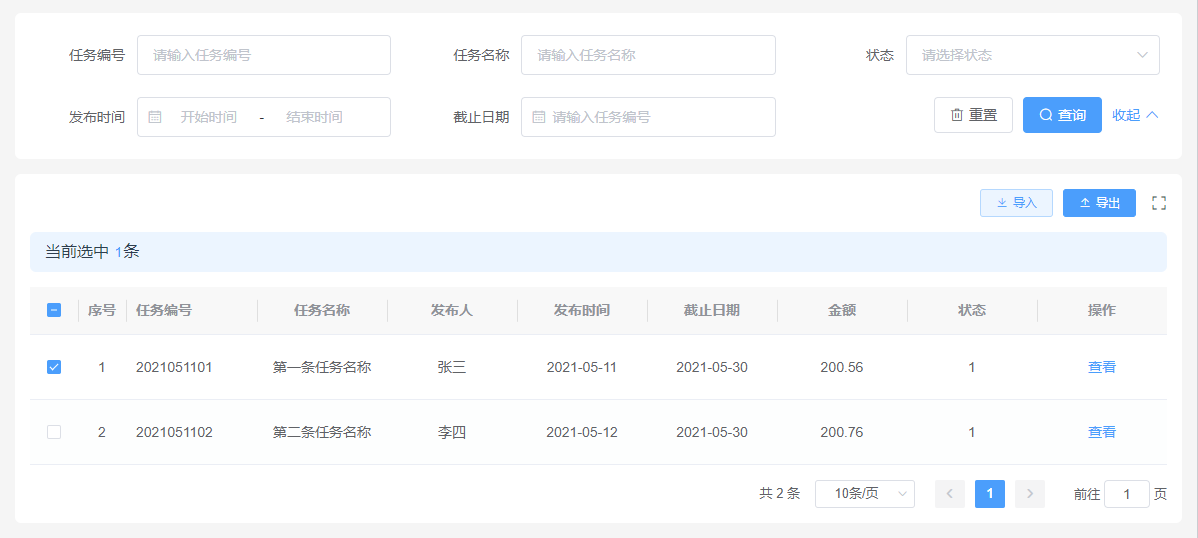
在 vue2 中使用
<template>
	<el-table-pro :columns="columns" :optionsRequest="optionsRequest" :request="request" selectable @selection-change="onSelectionChange">
		<!-- 使用表格自定义作用域插槽 -->
		<el-table-column slot="action" label="操作" align="center">
			<template slot-scope="scope">
				<el-button type="text">查看</el-button>
			</template>
		</el-table-column>
		<div slot="tool">
			<el-button type="primary" icon="el-icon-download" size="mini" plain>导入</el-button>
			<el-button type="primary" icon="el-icon-upload2" size="mini">导出</el-button>
		</div>
		<div slot="alert">
			当前选中
			<el-button type="text">{{ selectedTotal }}</el-button
			>条
		</div>
	</el-table-pro>
</template>

<script>
import ElTablePro from 'el-table-pack';
import { TableColumn, Button } from 'element-ui';

export default {
	name: 'Home',
	components: {
		ElTablePro,
		ElButton: Button,
		ElTableColumn: TableColumn
	},
	data() {
		return {
			columns: [
				{
					name: 'id',
					title: '任务编号',
					sort: 1
				},
				{
					name: 'name',
					title: '任务名称',
					sort: 2,
					headerTooltip: '任务名称提示信息',
					props: {
						align: 'center'
					}
				},
				{
					name: 'userName',
					title: '发布人',
					hideInSearch: true,
					props: {
						align: 'center'
					}
				},
				{
					name: 'time',
					title: '发布时间',
					sort: 5,
					hideInTable: true,
					formItemType: 'datePicker',
					formItemProps: {
						type: 'daterange',
						align: 'center'
						// "start-placeholder": "1开始日期",
						// "end-placeholder": "1结束日期"
					}
				},
				{
					name: 'endDate',
					title: '截止日期',
					formItemType: 'datePicker',
					sort: 6,
					props: {
						align: 'center'
					}
				},
				{
					name: 'income',
					title: '金额',
					hideInSearch: true,
					props: {
						align: 'center'
					}
				},
				{
					name: 'status',
					title: '状态',
					sort: 4,
					optionsKey: 'task_user_status',
					props: {
						align: 'center'
					}
				},
				{
					name: 'status',
					title: '固定下拉项',
					sort: 5,
					hideInTable: true,
					formItemType: 'select',
					options: [
						{
							label: '选项1',
							value: 1
						},
						{
							label: '选项2',
							value: 2
						}
					],
					props: {
						align: 'center'
					}
				},
				{
					name: 'action',
					title: '操作',
					hideInSearch: true
				}
			],
			selectedTotal: 0
		};
	},
	methods: {
		request(searchQuery, pageNum, pageSize) {
			return new Promise(function (resolve) {
				console.log('查询参数:', searchQuery);
				console.log('当前页码:', pageNum, '分页数量:', pageSize);
				resolve({
					rows: [
						{
							id: '2021051101',
							name: '第一条任务名称',
							userName: '张三',
							time: '2021-05-11',
							income: 200.56,
							endDate: '2021-05-30',
							status: 1
						},
						{
							id: '2021051102',
							name: '第二条任务名称',
							userName: '李四',
							time: '2021-05-12',
							income: 200.76,
							endDate: '2021-05-30',
							status: 1
						}
					],
					total: 2
				});
			});
		},
		optionsRequest(dictKey) {
			return new Promise(function (resolve) {
				console.log(`查询${dictKey}的字典项`);
				setTimeout(function () {
					resolve([
						{
							label: '选项1',
							value: 1
						},
						{
							label: '选项2',
							value: 2
						},
						{
							label: '选项3',
							value: 3
						},
						{
							label: '选项4',
							value: 4
						}
					]);
				}, 200);
			});
		},
		onSearch(query) {
			console.log('触发查询条件:', query);
		},
		onPageChange(data) {
			console.log('页码信息发生变化:', data);
		},
		onSelectionChange(selectedRows) {
			this.selectedTotal = selectedRows.length;
		}
	}
};
</script>
props 说明
| columns | Array | [] | 表格列设置 |
| request | Function | undefined | 表格数据加载方法,当配置此项后数据加载查询全程由组件全程托管,当不需要托管时可使用自定义加载 |
| showIndex | Boolean | true | 是否展示序号列 |
| selectable | Boolean | false | 是否开启 select 多选 |
| tableTitle | String | undefined | 表格显示标题 |
| span | Number | 3 | 查询表单默认展示列数量 |
| stripe | Boolean | true | 是否开启斑马纹样式,默认开启 |
| labelWidth | Number | undefined | 查询表单 label 展示宽度 |
| tableProps | Object | {} | 表格可配置的其他 props 参数 |
| tableColumnEmptyLabel | String | '' | 当列数据为空时展示的占位文本 |
| paginationProps | Object | {background: true, "page-size": 10, layout: "total, sizes, prev, pager, next, jumper"} | 分页条属性配置 |
| optionsRequest | Function | undefined | select 组件的数据加载方法 |
| data | Array | [] | 表格数据,当配置了 request 方法时,data 属性将不会生效 |
| total | Number | 0 | 表格数据总量 |
| loading | Boolean | false | 控制 table 加载状态 |
| fetchAfterReady | Boolean | true | 在table准备就绪后是否立即触发request请求方法 |
columns 列说明
| name | String | 当前列的引用字段 |
| title | String | 列显示名称 |
| sort | Number | 查询表单的排列顺序 |
| defValue | any | 查询表单项默认值设置 |
| hideInSearch | Boolean | 在查询表单中隐藏 |
| hideInTable | Booeanl | 在表格隐藏 |
| headerTooltip | String | table表头展示的提示信息 |
| formItemType | String | 查询表单类型,支持 input,select,datePicker,timePicker,任何不受支持的 formItemType 都会被默认为 input |
| optionsKey | String | 字典项引用字段,当配置此项,任何 formItemType 将会被强制忽略, formItemType存在时必须配置optionsRequest |
| options | Array | ts{label: string, value: any}[] options 和 optionsKey 是个二选一选项,optionsKey 优先级高于 options,他们都为 formItemType 为 select 的项服务 |
| formItemProps | Object | element-ui 表单组件相应的配置属性 |
| props | Object | element-ui table组件相应的配置属性 |
自定义加载
:data='tableDataList' :total='tableTotal' @search='onSearch' @pageChange='onPageChnage'
- 配置 data 属性
- 配置 total 属性
- 监听 search 事件
- 监听 pageChange 事件
表格工具栏插槽
<div slot="tool">
	<el-button type='primary' icon='el-icon-download' size='mini' plain>导入</el-button>
	<el-button type='primary' icon='el-icon-upload2' size='mini' style='margin-right: 20px'>导出</el-button>
</div>
表格 alert 显示区域插槽
<div slot='alert'>
	当前选中<el-button type='text'>{{selectedTotal}}</el-button>条
</div>
事件
- @selection-change 当选择项发生变化时会触发该事件
- @queryChange 当查询表单项发生变动时会触发改事件
- @search 用户点击查询或重置会触发该事件(当用户配置了 request 的情况下不会触发)
- @pageChange 当表格分页信息发生变化时会触发该事件(当用户配置了 request 的情况下不会触发)
request 加载方法说明
方法会接收到 searchQuery(查询条件),pageNum(当前页码),pageSize(分页加载数量)的参数,且方法需要返回一个 Promise 的对象,且状态为 resolve 且格式为{rows: [], total: number}的值
type request = (searchQuery: {}, pageNum: number, pageSize: numner) => Promise<{ rows: []; total: number }>;
optionsRequest 下拉选加载方法说明
方法会接收一个 optionsKey 的配置项,且方法需要返回一个 Promise 的对象,且状态为 resolve 且格式为[{label: string, value: any}]的值
type option = { label: string; value: any };
type optionsRequest = (optionsKey: string) => Promise<option[]>;
License
MIT




